Subscribe For Free Updates!

We'll not spam mate! We promise.

Wednesday, 21 August 2013

Three Important Steps for the Most Efficient SEO Practices

The efficient SEO practices produce effective results. For those who are spending a generous amount of their funds for implementation of a variety of SEO strategies it is quite important to employ the most efficient SEO practices to achieve the most effective results from search engine marketing. Just putting money and waiting to see that targeted traffic will pour in is a laid back attitude and it is much likely to produce no desired results.


Some important points to be considered to make the SEO techniques viable for your blog or website promotion are given here:

Consider Deeply Before Investing to Hire SEO Services

Ponder over the fact deeply if the investment made on hiring the services of an SEO company are justifiable for the end results you are getting out of it. See how significant is the increase in your visitors and how many people are interested in the products and services you are promoting. 

Does the overall cost justify the SEO services you are getting in return of your payments? Are you really paying for what you wish to obtain in return? We had had a lot of experience in seeing many of our friends and acquaintances that they pay a lot for what they either don’t actually want or what they actually don’t require. They are in fact incapable of identifying what kind of SEO they really need for their business promotion.  


Now what to do under these circumstances? 


1. Calculating the Cost and Sales


First step in this regard is to obtain two or three quotes from the SEO firms and then calculate the number of sales that would be required or that you could possibly make each month to cover the overall amount.  So, bank on this marketing strategy for prolific results. 


2. Competition in the Industry


The second important consideration is that if the niche of your blog or website belongs to an exceedingly competitive industry, you might discover that a huge investment is required to get the desired results. Again you have to calculate the cost-benefit relationship for productive out comes. 

You Might Also Like : Add Stylish Email Subscription Box In Header With Social Icons

3. Increase the Absorbing Capacity of Your Blog or Website


The third important consideration is that before making any investment in the SEO marketing of your blog or website you have to mull over the absorbing capacity of your blog or website. It means how powerful your site is to retain the visitors for long term. 

This is vital because existing visitors are a great source of promotion of products and services offered by you. They play their part in driving potential as well as organic visitors to your blog or site. 

For the said purpose your site must be attractive and well presented. The content on the site must be useful, related to your industry and providing constructive information to the readers. The appealing and excellent quality content is much likely to retain the visitors for long time and they are expected visit several pages which increases the chances of more clicks on Ads. 

If the layout of the site or blog is dull and deprived and is the visitors aren't able to find quickly and easily what they are searching for it is certainly difficult to convert the visitors in to desired customers. Choose a professional firm which makes your website more absorbing and engrossing through effective SEO and placing high quality related content on it. 

You Might Also Like : Google Search Engine Optimization eBook 2013

Conclusive Thought


In short, and by and large if you are taking care of the promotion of your blog or website by spending on SEO marketing you must already have a high quality website or blog in place that is just waiting for targeted and organic traffic. A well managed strategy and an attractive landing place for visitors will lure your customers to buy the products and services offered on your niche.

Sunday, 4 August 2013

Add Stylish Email Subscription Box In Header With Social Icons

Till yet , we have been sharing many cool, stylish and popular widgets in blogger which are world widely used by famous bloggers and are the demands of many newbies. Today, we are going to share another awesome widget with you which is Stylish Email Subscription Box In Header With Social Icons. This is the best widget to make your visitors your loyal subscribers within no time. Its place is Header so, every visitor's eye can catch it easily and they will subscribe to your blog. You can also see the same widget on our blog in the header, so we always loyal content with you :).

What's Special In It ?

This is the stylish and clean header email subscription widget in which social buttons or icons are also available for increasing social followers. This widget is divided into two sections. Left portion of this widget is having subscription form where Name and Email field are implement along with the subscribe button. Heading and a little spam message is also available in that area. While right portion of this widget is having the social buttons which are Facebook, Twitter, Google+, Feed burner and Pinterest. This widget will surely rock because it will be located at the header area and that's the most prominent place of catching visitors attention.

How To Add This Widget ?

Well, I have told you some of the quality aspects of this widget now its turn to add it to your blog. Following is the method to add it
  • Go to Blogger >> Layout >> Add a gadget (In the header area)
  • Chose HTML/JavaScript and paste the following code in content area
<style>
 #byard-topsubsbox {background:#fff; width:940px!important; height:90px!important;margin-top:20px; padding:10px;box-shadow:5px 5px 5px #ccc; border:1px solid #ddd;overflow:hidden;}  #subscriptionsection {float:left;border-right: 1px solid rgb(168, 168, 168);padding-right: 56px;margin-top: -10px;padding-top:9px;}  .subsbox-heading {font-size:20px; font-family:&#39;Source Sans Pro&#39;; text-align:center;text-shadow:1px 1px 1px #ABABAB;font-weight:bold;}  .topsubsboxname {background:#fff url(https://blogger.googleusercontent.com/img/b/R29vZ2xl/AVvXsEhUMEiXnBK5Xrl1k_bcoAD2IjP_M9kgznv_aNHBuJWFUs8eMXScV9gmYvP3HRkxvUg1sPHjOKfsmdoSVOjwUK7D9GBKFO26ebagS3TAff1vJ1BbXmGLqD6TY3e81Cs4uDRqCFCViscnKZg/s320/name.png) no-repeat 7px 8px;border:1px solid #ddd; font-family:Arial,sans-serif; font-size:13px; font-weight:bold;color:hsla(0,0%,27%,0.69); width:150px; margin-top:10px; height:24px; padding:5px 15px 5px 28px; vertical-align:top; display:inline-block;margin-left:15px;}  .topsubsboxemail {background:#fff url(https://blogger.googleusercontent.com/img/b/R29vZ2xl/AVvXsEjUdrKtD4_hYWYOaIdgmxWqSmKfi_P0YRcEZwHTCZ35NQsi1935Z4tNX0Owk-e6JfTAgGTDodZ_A04Xrq8jFzBjJLsmcjS8uwHjhaA6j_o8j8d7puWxNroqs2TbsCORiZBCwEJHEHVyw6E/s320/email.png) no-repeat 7px 10px; border:1px solid #ddd; font-family:Arial,sans-serif; font-size:13px; font-weight:bold; color:hsla(0,0%,27%,0.69); width:150px; height:24px; margin-left:5px; margin-top:10px; padding:5px 15px 5px 28px;vertical-align:top; display:inline-block;}.topsubsboxname:hover,.topsubsboxemail:hover {border:1px solid #bebebe; box-shadow:0.5px 1.5px 2px rgba(5,95,255,.1);}.topsubsboxbutton {-moz-box-shadow:inset 0px 1px 0px 0px #bbdaf7;-webkit-box-shadow:inset 0px 1px 0px 0px #bbdaf7;box-shadow:inset 0px 1px 0px 0px #bbdaf7;background:-webkit-gradient( linear, left top, left bottom, color-stop(0.05, #00B3FF), color-stop(1, #349ECB) );background:-moz-linear-gradient( center top, #00B3FF 5%, #349ECB 100% ); filter:progid:DXImageTransform.Microsoft.gradient(startColorstr=&#39;#00B3FF&#39;, endColorstr=&#39;#349ECB&#39;);background-color:#00B3FF;  margin-top:12px;  margin-left:5px;-moz-border-radius:6px;-webkit-border-radius:6px;border-radius:6px;border:1px solid #84bbf3;display:inline-block;color:#ffffff;font-family:arial;font-size:15px;font-weight:bold;padding:6px 10px;text-decoration:none;text-shadow:1px 1px 0px #528ecc;}.topsubsboxbutton:hover {background:-webkit-gradient( linear, left top, left bottom, color-stop(0.05, #349ECB), color-stop(1, #00B3FF) );background:-moz-linear-gradient( center top, #349ECB 5%, #00B3FF 100% );filter:progid:DXImageTransform.Microsoft.gradient(startColorstr=&#39;#349ECB&#39;, endColorstr=&#39;#00B3FF&#39;);background-color:#349ECB;}.topsubsboxbutton:active {position:relative;top:1px;}  #socialsection {float:left;margin-top:20px;}  .socialheading{font-size:20px; font-family:&#39;Source Sans Pro&#39;; text-align:right;margin-right:20px;text-shadow:1px 1px 1px #ABABAB;font-weight:bold;}  .socialicons ul {list-style:none; display:inline;float:right;margin-top:10px;margin-right:10px;}.socialicons li {opacity: 1;float:left;padding: 0px 10px 0px 0px;}.socialicons li:nth-child(6) {padding: 0;}.socialicons li a img{height:49px;width:49px}</style>
<!-- Top Subsbox By Www.ProBloggersCafe.Com Start --><div id='byard-topsubsbox'><div id='subscriptionsection'><div class='subsbox-heading'>Subscribe For Free Updates!</div> <form action='http://feedburner.google.com/fb/a/mailverify?uri=ProBloggersCafe' class='byard-subsbox-form' method='post' target='_new'>  <input class='topsubsboxname' name='name' onblur='if (this.value == &apos;&apos;) {this.value = &apos;Your Name&apos;;}' onfocus='if (this.value == &apos;Your Name&apos;) {this.value = &apos;&apos;;}' value='Your Name'/>  <input class='topsubsboxemail' name='email' onblur='if (this.value == &apos;&apos;) {this.value = &apos;Your Email Address&apos;;}' onfocus='if (this.value == &apos;Your Email Address&apos;) {this.value = &apos;&apos;;}' value='Your Email Address'/>  <input class='topsubsboxbutton' type='submit' value='Sign Up!'/> </form>  <p style='margin-top: 8px;font-size: 13px;text-align: center;font-family: Source Sans Pro;font-style: italic;font-weight: 600;'>We&#39;ll not spam mate! We promise.</p>
  </div><div class='socialicons'>  <div class='socialheading'>Become Our Fan on Social Sites!</div>
<ul><li><a href='https://www.facebook.com/ProBloggersCafe'><img src='https://blogger.googleusercontent.com/img/b/R29vZ2xl/AVvXsEi_MdGnZsFP18Fh6lcDvUcIkXuChyphenhyphenoE9vHgZyqhpNlUrsEczf5YJXdkTD9SelzOBwmul03n9bpGesVKXZlSc4D3n_DWQ3UEkReAVpuIA3fdWanFVo7_dIxOS54rGdc-7O9nXFifKC7j7k0S/s1600/facebook_64.png' title='Facebook'/></a></li><li><a href='https://twitter.com/ammarkn98'><img src='https://blogger.googleusercontent.com/img/b/R29vZ2xl/AVvXsEgIp5DT4aqVsnpyG-GbrF5sSCmIX_VRG3fzIGZXPBM2NHvkLBJYZKHzCYnc-l3SHWTKxzAGDDrbDBuGOLdefGTpNUq7NmOuF_dZ_OZRJAs-0MKWs1vAYFfIQEW1J66P2_H2lVGSEePSWGi1/s1600/twitter_64.png' title='Twitter'/></a></li><li><a href='https://plus.google.com/101996924620264617682/'><img src='https://blogger.googleusercontent.com/img/b/R29vZ2xl/AVvXsEjuOmes4_PXobHaqsfwvSYTLd1SKSnRTQ5oxLe47oGm2XcJj1W9czZJl7obqLWaC8KF5MmBERWzYu1mhyphenhyphenjgQ38u6oqNocwDeX9WVHntEqLs8P8Pnb6jFNGIzUVgZKV-akwBkg012jagS-ix/s1600/google-plus_64.png' title='Google +'/></a></li><li><a href='http://feeds.feedburner.com/ProBloggerscafe'><img src='https://blogger.googleusercontent.com/img/b/R29vZ2xl/AVvXsEi3_YtbY4t7XkbPQmQsp6S1I4Nyj_dgPDBOvLuHB7D7JMRBpkvJtfBNgb3VQ6ozX5GFpCctudWDy2asZlkdEBMGZa30Z3I_RgctmI4hbJDLcirE84srPj3YLOgYljAefKUR6UMOXp_40-w0/s1600/rss_64.png' title='Rss'/></a></li><li><a href='http://pinterest.com/yaqoobhisbani/'><img src='https://blogger.googleusercontent.com/img/b/R29vZ2xl/AVvXsEhlzfH0LCag80HKxHuFGOQbayJKhclVr11OPL0CIZtVXRsyUiH9SWeR9Uh-eJxosyA5i4YbSuYY7o71-lD_N52NNW3kg0owih_s71RTGt4-s6wz6odI6AEOJuwdabOnelBUyS4Lsoy_m8dE/s1600/pinterest_64.png' title='Pinterest'/></a></li></ul>  </div>    </div><!-- Top Subsbox By Www.ProBloggersCafe.Com End -->


  • Replace the highlighted URL's with yours
  • Click "Save" and you are done !

 Your Turn :

Today ! we have shared a worth using widget for you. Now, its your turn share thoughts and views about this widget with us. Comment below if you have any problems or queries regarding this widget and let us know if you have some better ideas or widgets of this type. Till Then Happy Blogging ........ Roger And Out !


Saturday, 3 August 2013

Facebook Pop-up Like Scrolling Widget For Blogger


In the world of blogging widgets have always got a high priority and infact they are considered the top source to bring traffic to your blog. Widgets are very important as they allow people to like your content and share it easily with other people. We, have always shared quality and useful widgets with you and once again today following out tradition we are going to share a nice widget with you which is name as Facebook Pop-up Like Scrolling Widget.


Something Special In This Widget

As social media is the top source for getting free and targeted traffic so today's widget allows your readers to show your content on Facebook with other people and surely it brings more traffic to your blog.

Some Functions Of It :


  • It has scrolling feature that lets it to Round UP and DOWN with the movement of Mouse Pointer.
  • It loads Faster and appears in seconds within the page opening.
  • It has an attractive style which catches the visitors attention to Like
  • It doesn't get bored any visitor because of its hiding feature that is found at the Top Right corner of the pop-up
  • The most important thing in this is the close-up to the number of your page likes (If you've more than 1000 likes, you've more chances to get Likes)

How To Add This Widget On Your Blog ?

  1. Sign in to your blogger account and the select the blog for which you want to add this widget in.
  2. Go to Layout >> Add A Gadget.
  3. Select Html/Java Script from the Pop-up tab that appears after clicking on Add A Gadget. Another Pop-up window will open.
  4. Paste the below code in the new pop-up window
<style type='text/css'>#KBTricksFBpop {position:fixed !important;position:absolute;top:-1000px;left:50%;margin:0px 0px 0px -182px;width:300px;height:auto;padding:16px;background:#FEFEFE;font:normal Dosis, Georgia, Serif;color:#111;border:2px solid #333;-webkit-box-shadow:0px 1px 2px rgba(0,0,0,0.4);-moz-box-shadow:0px 1px 2px rgba(0,0,0,0.4);box-shadow:0px 1px 2px rgba(0,0,0,0.4);-webkit-border-radius:10px;-moz-border-radius:10px;border-radius:10px;}#KBTricksFBpop a.kbtricksclose {position:absolute;top:-10px;right:-10px;background:#fff;font:bold 16px Arial, Sans-Serif;text-decoration:none;line-height:22px;width:22px;text-align:center;color:#000000;border:2px solid #333;-webkit-box-shadow:0px 1px 2px rgba(0,0,0,0.4);-moz-box-shadow:0px 1px 2px rgba(0,0,0,0.4);box-shadow:0px 1px 2px rgba(0,0,0,0.4);-webkit-border-radius:22px;-moz-border-radius:22px;border-radius:25px;cursor:pointer;}</style> <script type="text/javascript" src="http://ajax.googleapis.com/ajax/libs/jquery/1.4.1/jquery.min.js"></script><script type='text/javascript'>$(window).bind("load", function() {// Animate Top$('#KBTricksFBpop').animate({top:"50px"}, 1000);// Widget by www.kbtricks.com$('a.kbtricksclose').click(function() {$(this).parent().fadeOut();return false;});});</script><div id='KBTricksFBpop'><!-- Widget by www.probloggerscafe.blogspot.com Start --><center><b><a class="KBTricks">Don't Forget To Join With Our Community</a></b></center><center><iframe src="//www.facebook.com/plugins/likebox.php?href=https%3A%2F%2Fwww.facebook.com%2FProBloggersCafe&width=292&height=258&show_faces=true&colorscheme=light&stream=false&show_border=true&header=false" scrolling="no" frameborder="0" style="border:none; overflow:hidden; width:292px; height:258px;" allowtransparency="true"></iframe></center><!-- Widget by www.probloggerscafe.blogspot.com End --><a class='kbtricksclose' href='#'>×</a><center style="float:right; margin-right:10px;"><span style="font-size:xx-small; color:#000; text-decoration:none;">+Get this at</span> <a target='_blank' style="font-size:xx-small; color:#3B78CD; text-decoration:none;" href="www.probloggerscafe.blogspot.com/2013/07/Facebook-Scrolling-Like-Box-Widget.html">Pro Bloggers Cafe</a></center></div> 
Note : Change ProBloggersCafe According to your Facebook Fan Page username.

Your Turn :

We shared an immense widget for you today. Please give it a try and we hope it will really amaze you. Now, please let us know about your thoughts and reviews about this gadget via the below comment section. Till Then Happy Blogging .... Roger And Out! 

Friday, 2 August 2013

Awesome Multi-Colored Popular Posts Widget for Blogger powered CSS3

Popular Posts Widget is a Widget providing by Blogger and we can add it to our Blog. This Widget displays the Most viewed posts of your blog, that may be of Month or in Week or All the time. You can select how Popular posts are to be displayed.By default it shows an image(if the post has) and Title of Post followed by the content of post wrapped by 20-25 Words. This article is a tutorial to Style that Popular posts Widget to an Awesome Multi - colored Popular posts Widget. This trick is done using simple CSS3 rather than using complex JavaScripts. A great feature of this trick is each Post shown in each Flat UI color, so these colors catches your Blog visitor's eyes and they have the tendency to take that post even if the Post is 


Features of this Widget


  • Flat UI colors used (it will attract users attention)
  • Automatic Post Numbering
  • CSS3 Hover Animation 

How To Add This Widget ?

Sign in to your blogger account and add Popular Post Widget
First Add Popular post Widget to Blogger


  • Go to Layout -> Select "Add a Gadget" and take Popular Posts Widget from the Widget List appear.
  • Give Title of widget, select how the popular posts should be appeared(in Month,or Week or All time) and click Save 
  • Go to Template -> Edit HTML, Find ( Ctrl + F ) ]]></b:skin>


Copy the following code and Paste just above it
<!-- Popular posts multi colored UI theme -->#PopularPosts1 ul{margin:0;padding:5px 0;list-style-type:none}#PopularPosts1 ul li{position:relative;margin:5px 0;border:0;padding:10px}#PopularPosts1 ul li:first-child{background:#ff4c54;width:97%}#PopularPosts1 ul li:first-child:after{content:"1"}#PopularPosts1 ul li:first-child + li{background:#ff764c;width:87%}#PopularPosts1 ul li:first-child + li:after{content:"2"}#PopularPosts1 ul li:first-child + li + li{background:#ffde4c;width:84%}#PopularPosts1 ul li:first-child + li + li:after{content:"3"}#PopularPosts1 ul li:first-child + li + li + li{background:#c7f25f;width:81%}#PopularPosts1 ul li:first-child + li + li + li:after{content:"4"}#PopularPosts1 ul li:first-child + li + li + li + li{background:#33c9f7;width:78%}#PopularPosts1 ul li:first-child + li + li + li + li:after{content:"5"}#PopularPosts1 ul li:first-child + li + li + li + li +li{background:#7ee3c7;width:75%}#PopularPosts1 ul li:first-child + li + li + li + li + li:after{content:"6"}#PopularPosts1 ul li:first-child + li + li + li + li + li +li{background:#f6993d;width:72%}#PopularPosts1 ul li:first-child + li + li + li + li + li + li:after{content:"7"}#PopularPosts1 ul li:first-child + li + li + li + li + li + li +li{background:#f59095;width:69%}#PopularPosts1 ul li:first-child + li + li + li + li + li + li + li:after{content:"8"}#PopularPosts1 ul li:first-child + li + li + li + li + li + li + li +li{background:#c7f25f;width:66%}#PopularPosts1 ul li:first-child + li + li + li + li + li + li + li + li:after{content:"9"}#PopularPosts1 ul li:first-child:after,#PopularPosts1 ul li:first-child + li:after,#PopularPosts1 ul li:first-child + li + li:after,#PopularPosts1 ul li:first-child + li + li + li:after,#PopularPosts1 ul li:first-child + li + li + li + li:after,#PopularPosts1 ul li:first-child + li + li + li + li + li:after,#PopularPosts1 ul li:first-child + li + li + li + li + li + li:after,#PopularPosts1 ul li:first-child + li + li + li + li + li + li + li:after,#PopularPosts1 ul li:first-child + li + li + li + li + li + li + li + li:after{position:absolute;top:20px;right:-15px;border-radius:50%;background:#353535;width:30px;height:30px;text-align:center;font-size:28px;color:#fff}#PopularPosts1 ul li .item-thumbnail{float:left;border:0;margin-right:10px;background:transparent;padding:0;width:70px;height:70px;}#PopularPosts1 ul li a{font-size:13px;color:#444;text-decoration:none}#PopularPosts1 ul li a:hover{color:#222;text-decoration:none}#PopularPosts1 img{-moz-border-radius: 130px;-webkit-border-radius: 130px;border-radius: 130px;-webkit-transition: all 0.3s ease;-moz-transition: all 0.3s ease;transition: all 0.3s ease;padding:4px;border:1px solid #fff !important;}#PopularPosts1 img:hover {border-radius: 0 0 0 0;-moz-transform: scale(1.2) rotate(-711deg) ;-webkit-transform: scale(1.2) rotate(-711deg) ;-o-transform: scale(1.2) rotate(-711deg) ;-ms-transform: scale(1.2) rotate(-711deg) ;transform: scale(1.2) rotate(-711deg) ;}<!-- popular posts multicolored UI theme -->

  • Click on Preview Template (You can see the template without saving)
  • Save the Template. 
View Your Blog it is ready to attract users. I think this article will help you if so please share and Like us to spread our Blog.If any problems with this trick don't hesitate to ask, do comment here...


Wednesday, 31 July 2013

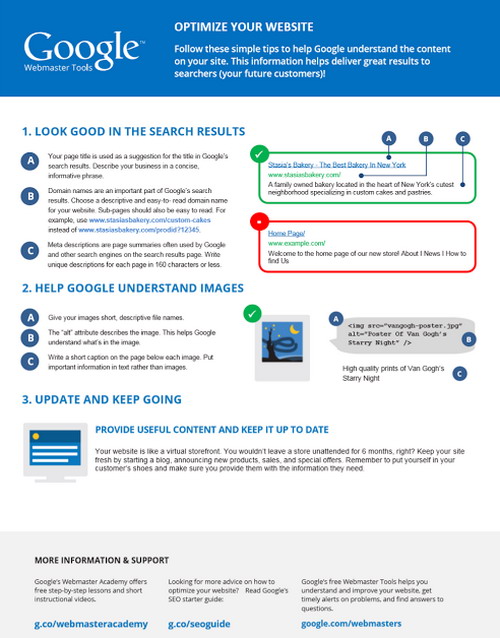
Google Search Engine Optimization eBook 2013

This Google SEO book is world widely distributed by the Top Pro Bloggers and SEO analysts. Since, from the couple of days we were searching for a better on page SEO book to optimize blog on page structure and SEO friendly. This book is a little guidance about the basic SEO terminologies for on page SEO. So, if you are a beginner in blogging career and want to do a perfect on page SEO than you don't need to hire any SEO specialist. We are pretty confident that after reading this tremendous SEO book you will be able to on page SEO tips for your own blog. Before publishing this SEO eBook there were also several splendid Search Engine Optimization Books released by Google Team.

Google SEO Book 

You may already know or not that, each year Google releases SEO guides for bloggers when they make some changes in their algorithm. However,  they also published some live SEO videos along with publishing new SEO eBook. So, this eBook includes some limited SEO Tips consisting of all most one page, helpful for all beginner and newbies bloggers to optimize their newly born websites or blogs. 


Free Download Google SEO eBook


 You might know that Google provides 99.9% products free of cost. There are dozens of products beside this SEO eBook which also provided for free by Google. So, few months back they announced Google SEO eBook publicly which also completely free of cost. You can easily download it from the below given links.

Share Your Views

So , guys ! Today we shared a cool and free SEO eBook published by Google with you. We hope you will get great knowledge and advantage by reading this eBook. We have personally applied all the instruction given in this eBook to our blog.

We hope you will appreciate and love this eBook. It will prove as an advantage in optimizing your blog's on page and off page structure. So, if you think anything is missing in this book than you can as PBC's Editorial Team. Just post your queries and questions below in the comment box and you will get instant replies. Till Then Happy Blogging ..... Roger And Out !! 


Tuesday, 30 July 2013

Latest Google Panda Update Rolled Out On 18 July 2013

It has been confirmed from Google, that the latest new version of 26th Panda Update has been rolled on 18th July 2013. Many popular blogs and websites have been listed down in SERP (Search Engine Result Pages) which have poor contents and incoming backlinks flow from low quality blogs and directories. By taking a reciprocal of 26th Panda Update there are out thousands of blogs and websites which have increased their ranking in SERP several times, on the other hand we can also say that "Panda does not only destroy your page rank but it can also help in increasing your page rank well" however, if you have unique and high quality content and also by applying white SEO rather than Black SEO. This Panda Update has killed alot of blogs and and still its going rarely in finding all the blogs generating low quality contents, building paid and or low back-links and copycat websites/blogs.

Since from the last 10 days , we have been receiving alot of queries from our readers and we have also seen the same situation on several blogs that the readers are saying that blog traffic is going down day by day and how to recover from it and receive massive and increased traffic as usual. So, after a great series of researches and analysis about this issue PBC Editorial Team finally came to know the exact answer and today we will show you why you are unable to get traffics and losing your rank in Search Engine Results. So, our today's post will be about all the 26 Google Panda Updates.


Google Panda Update Series 

To know curiously about Google Panda Update you must know about the previous and new Google Panda Updates and do compare your blog statics and analysis with new and previous Google Panda Updates.


  1. Panda Update 1, Feb. 24, 2011
  2. Panda Update 2, April 11, 2011
  3. Panda Update 3, May 10, 2011
  4. Panda Update 4, June 16, 2011
  5. Panda Update 5, July 23, 2011
  6. Panda Update 6, Aug. 12, 2011
  7. Panda Update 7, Sept. 28, 2011
  8. Panda Update 8, Oct. 19, 2011
  9. Panda Update 9, Nov. 18, 2011
  10. Panda Update 10, Jan. 18, 2012
  11. Panda Update 11, Feb. 27, 2012
  12. Panda Update 12, March 23, 2012
  13. Panda Update 13, April 19, 2012
  14. Panda Update 14, April 27, 2012
  15. Panda Update 15, June 9, 2012
  16. Panda Update 16, June 25, 2012
  17. Panda Update 17, July 24, 2012
  18. Panda Update 18, Aug. 20, 2012
  19. Panda Update 19, Sept. 18, 2012
  20. Panda Update 20 , Sept. 27, 2012
  21. Panda Update 21, Nov. 5, 2012
  22. Panda Update 22, Nov. 21, 2012
  23. Panda Update 23, Dec. 21, 2012
  24. Panda Update 24, Jan. 22, 2013
  25. Panda Update 25, March 15, 2013
  26. Panda Update 26, July 18, 2013 (confirmed)

Compare Your Blog Statics With Google Panda Update

To know, the exact result that whether your blog is penalized by Google Panda Update, lets do this, open your Google Analytic account and compare your blog rank from July 20, 2013 to current date  , if there is continuous step by step zig zag path with dropping rank stats than chances are high that your blog may be affected by Google Panda Update. While on the other hand, if you see a dramatic change in increased rank of your blog than don't worry and take a cup of tea.
google panda update

After Panda Update (Dropping Traffic)
dropping traffic

After Panda Update (Increase In Traffic)
Increase in traffic

How To Recover From Panda Update

After checking out you blog stats in Google Analytic you must have came to know that either your blog is penalized or not. However, if you have been penalized by Google Panda Update than following are the tips for you which will help you in brining your blog out of the affect of Google Panda Update and will treat your blog again for better SERP. So, before getting more affected lets do the follow tasks for the sake of your blog


  • Start guest postings and Join Forums to build quality backlinks
  • Remove unusual and low quality backlinks flowing from non-pr blogs
  • Update your bog tremendously several times a day
  • Edit your previous posts and make them Robots Friendly
  • Remove all posts keeping high keywords stuffing
  • Avoid paid backlinks and cancel your current deals

What About Upcoming Google PR After Panda Update

As several times it happened, Google Page Rank updates after the latest Google Panda Update. Most of the Pro Bloggers and webmasters are waiting for the Google Page Rank Updates since the last five months. But,  now we can surely say that Google page rank will soon be updating its algorithm after Panda Update. So, guys ! Google PR will be coming soon, BE READY!

Wish To Get High Google Page Rank:

Tips to do before Google PR Update :
  1. Maximize your traffics
  2. Give value to high authority blogs
  3. Build backlinks from high PR blogs
  4. Boost your posts several times a day

What Your Blog Stats Say After Google Panda Update ?


After reading all the tips mentioned above, you can share your precious thoughts with us and let us know How many times your blog traffic increased or decreased ? after Google Panda Update. Also share your ideas about Google PR & Google Panda. 
Till Then Happy Blogging ..... Roger And Out !


Monday, 29 July 2013

How To Write Quality & Original Content For Your Blog

As you may have heard that search engines usually Google loves to index quality and original content. But the question is ; How to write quality and original content for your blog or website ? So , today I have come up with few tips regarding this topic and I hope that you will find my tips useful. Mostly this happens to people who are not professional writers but want to become pro bloggers therefore , they cannot write good contents for their blogs and suffer for a long time. Also people , who are not good at English face a lot of difficulties writing quality and unique content. So today , we will discuss it in this post and well discover some useful ideas and tips. However , quality content may still be unknown for some reasons, but we can define some aspects of quality content on the web.

How To Write Unique & Quality Content ?  

Quality content can simply be defined as the content which attracts the visitors to read it from starting till end. You can make your content worth quality by adding values to it, adding values means, that you fully cover the topic that you are writing on, and make sure you present your content in a professional way, use short paragraphs with appropriate headings. Also try to keep the visitors entertaining to make the read the post till end.

Your post or article must have three parts :
  1. The introdution about the topic
  2. The information about the topic
  3. The Summary about the topic (At End)
The Introduction about the topic will decide about the quality of your content, so work more hard on the first part, and make that stunning.

Before writing a proper article, first make a proper search on it through internet, read top 3 to 6 articles which are already published on the same topic.

By researching on the internet and reading already published articles,you will come to know that something was messing in those articles which you read.

So , you will be able to write the same topic in your won magical words. This is not a very big deal, you can write a 500 words quality article quite easily.


Make Your Content Beautiful 

As I already mentioned that you should make your first paragraph attractive, but sorting your content in a professional is another Golden key to success. People always love to read articles which are in short paragraphs and have every point described in its respective para.

Finally, if you have written an article about anything i.e an incident, breaking news, tips and whatsoever, just make it sure, whether you have presented the story in details and will it help people or not ? and will it be useful for them or not ?. Think as imagining yourself a reader and if you like the article publish it. But if you yourself don't like the content than don't waste other's time too.

Sunday, 28 July 2013

How to Keep Your Audience Coming Back for More? 4 Ways

Getting traffic to your blogs is not a rocket science. When you done few things right you can bring lots of organic traffic to your sites within less time (having targeted keywords in mind, proper SEO blog structure, internal linking etc.)

But it’s hard to sustain your blog readership for a long time, agree?

If you want to keep your audience coming back for more, here are few things to do.

How to keep your audience coming back for more

Capture email addresses by giving more

One of the best ways to bring people again and again to your blogs is by capturing their emails. Whenever you publish a new article on your blog, you can use newsletters to send them to your subscribers to keep them coming back for more.

Having a great email list will not only increase website traffic, it also improves your product sales. But you must provide value to your email subscribers often to make money from your email marketing campaign.

Here are few simple ways to build your email list faster.

  • Give away something for FREE (plugin, theme or eBook etc)
  • Always write great contents
  • Use social media sites to bring more people to subscribe
  • Use landing pages


Be active on social media

Social media has become a vital place for most bloggers to spread their ideas and brand.

Social media platforms like Facebook, twitter, Google+ etc will not only bring more online visibility for your blogs, but they will also have the tendency to make your blog go viral.

If you have more followers and fans on social media sites, you can bring drastic changes on your blogging journey. It’s very important for anyone who is blogging for a while to improve their social media interaction to boost their online presence.

If you are always posting useful stuff on your social media profiles, you will definitely be creating curiosity on your fans to read your links whenever you post something on your profiles. So always spend time on social media sites to share others stuff and to boost your online brand to keep your audience coming back for more stuff.

Create series posts

Series posts are attention pullers, most online readers visit your blogs again and again when you have right combination of series posts.

You can start writing series posts on any topic that your readers might be interested in. Few examples are, if you are running a bike advice blog, you could come up with “bike cleaning tips”, “bike maintenance service tips for busy people” etc. This way you will be able to grab the people’s attention who is interested in reading your stuff.

Moreover you can grab their email address by asking them to subscribe at the end of your each post. If they find your series posts interesting, they will certainly do whatever you ask them to do.


Pro tip: Don’t write too many posts in your series posts, limit your posts to 5 to 7 articles and you can complete them by posting everyday on your blogs, thus finishing your series within a week.


Interviews will NEVER get old.

Interviewing someone in your niche is often a great way to get more traffic and attention from other bloggers.

You can see a huge traffic spike in your stats if you interview someone who is influential in your niche. It’s not always possible for a new blogger to conduct interviews of top bloggers, but you can always try interviewing the rising blogging stars in your niche. This way you can bring more online visibility in the early stages of your blog.

If you create a separate page called “Interview section” in your blog and conduct frequent interviews (monthly twice or so), you can bring more audience to your blog again and again. You will also have a tendency to get more likes, shares, tweets and comments on your blogs if they go viral.


Always ask great questions that will provoke your readers mind and build strong relationships with other bloggers by promoting their stuff. This is a win/win approach and you can see great results in no time.

Recommended : Simple Yet Practical Tips To Write More Blog Posts In A Day


Extra tip: Have an appealing blog design, your blog should be designed to get the reader to do something. It could be anything from getting a blog comment to buying your affiliate products. Invest money to buy a premium theme or hire a professional to get a unique design for your blog, after all, first impression is the best impression in blogging.

What next? Share your valuable views with us in the Comment section below.

Saturday, 27 July 2013

How to Add an Animated Ramadan Lantern Widget in Blogger

Animated Ramadan Widget For Blogger

Have you ever thought about decorating your Blogger Blog with something especial on the glorious occasion of Ramadan? The ninth month of the Muslim year, in which strict fasting is practiced from sunrise to sunset.Today in this article, we will show you how to add an Animated Ramadan Lantern in Your Blogger Blog.


How It Works ?

If you are curious to know how this widget looks like, then scroll back to the header of “ProBloggersCafe” and you would notice a Lantern spinning in both directions up to 180 Degree in a motion with a glowing Ramadan Kareem text written in Arabic. Below we have attached an image preview just in case if we make a decision to remove it in the future.
Animated Ramadan Widget For Blogger

Note: This Animated Ramadan Lantern is built with Adobe flash so if anyone who is running a browser without Flash would remain unable to see it working. However, nowadays, everyone is running on Smartphones and reliable operating systems like Windows 7 that has built-in Flash Installed, so it would certainly not create any big issue of compatibility. 

Since, you are adding it through Iframe so it would not consume a lot of memory of your site. In other words, it is pretty light-weight and hardly effects the speed of your website.

How to Add Animated Ramadan Lantern in Blogger?


The First thing you need to do to is go to Blogger.com and login into your Google Account. After logging in, you will be redirected to Blogger Dashboard. Now go to Your Blog >> Template >> Edit HTML and search for the ending </body> Tag. On finding the tag, just above it paste the following piece of code.

<!--  Ramadan Lantern By Probloggerscafe.blogspot.com --><div align="center"><table border="0" width="900" cellspacing="0" cellpadding="0"><tr>
<td width="900" height="0"><div style="float:top right; position:absolute; overflow:visible; left:45px; top:0px; height:192px; width:144px z-index: 9999;">
<object classid="clsid:D27CDB6E-AE6D-11CF-96B8-444553540000" id="obj2" codebase="http://download.macromedia.com/pub/shockwave/cabs/flash/swflash.cab#version=6,0,40,0" border="0" width="192" height="144"><param name="movie" value="http://mybloggerlab.com/Scripts/stardima.swf"/><param name="quality" value="High"/><param name="wmode" value="transparent"/><embed src="http://mybloggerlab.com/Scripts/stardima.swf" pluginspage="http://www.macromedia.com/go/getflashplayer" type="application/x-shockwave-flash" name="obj2" width="192" height="144" quality="High" wmode="transparent"></embed></object>   </div>  </td> </tr> </table></div>
Congratulations: Once everything is done, simply press the “Save” button and Animated Ramadan Lantern is ready, and good to be live on your website. Now go and check your website to see the Animated Ramadan Lantern in your Blogger blog.
We hope this widget would help you in decorating your blog with something new in this Ramadan. Please, test it on your blog or websites and let us know what do you think about it? Let us know about your thoughts by leaving a comment below. Lastly, do not forget to help us out by spreading the word.
Remember: This gadget is not only for Blogger users. Any platform that supports HTML and Flash could easily implement this on their websites including WordPress and etc.
Happy Blogging ... Roger Out !

Friday, 26 July 2013

Simple Yet Practical Tip To Write More Blog Posts In A Day

For a big majority of people working as a full time writer, the productivity remains a constant worry. Very few good writers can manage to write as many articles or blog posts that they’d like to, and those who manage to churn out good numbers, end up producing substandard ones more often than not, which are good only for run-of-the-mill article directories or content farms. You might be working as a freelance writer, or a full time blogger, but no matter what’s the nature of your job, writing more articles or blog posts in a day will surely help.

Just imagine one or two extra articles getting added to your tally on daily basis? That’s a fascinating thought without any doubt, but the problem is, how to break the plateau and go on to produce a little more than what has been your daily average.

I could have written a post full of impractical points that sound good when reading, but doesn’t really help when you’re trying to put them into practice. True that you can cut down the time you spend on watching TV, surfing the Internet, and utilize it for writing more, but such drastic measures will only add to the frustration because now your mind will not be getting the much needed break, and a tired or bored mind is the last thing you need to have when doing creative writing. Therefore, I’ve decided to keep it simple, and share one simple tip, which has helped me every now and then.

Here you go …

When I first started writing for web, I use to spend hours and hours on finding good topics to write on. At times, It took me longer to decide on a topic as compared to the time I took in completing an article (and I m not exaggerating). I used to spend quite some time on thinking of a topic and then doing some reading. Problem was that all my research and reading that sometimes spanned to hours ended up giving me just one article, that wasn’t really enough.

The solution that worked for me and might work for you:

You must have already guessed it by now. If you’re one of those honest writers/bloggers, who likes to do ample research before even starting to write on a topic, then you can reward yourself for all that research by doing at least two or more articles on the same topic. And before the cynics jump in and start flogging me for encouraging evil practices like “article spinning” or “article rephrasing”, let me clarify that I am not talking about simply rewriting the same content in 2 or 3 different ways. The point is that all that reading will give you quite a lot of food-for-thought, and there’s no reason why you should try to stuff all that information in just one article or blog posts. You can easily make two or more unique posts by covering different perspectives or viewpoints.

Bonus Tip :

If you’re writing for your own blog and you’re not comfortable with publishing two simultaneous posts on somewhat similar topics, you can use the other one as a guest post on another blog, and get a contextual link by linking back to your own blog … need I say more?

Wednesday, 24 July 2013

Add Facebook Activity Feed Plugin Widget To Blogger

Few days ago we shared the Facebook Floating Like Box Widget in Blogger which was well appreciated by our loyal readers. So , I decided to carry on the series and today I am going to share worth another Facebook Plugin Activity Widget. This Facebook Plugin appears on the right side of the blog along with all of the recent activites. By using this widget , you will see a dramatic increase in your blog page views and it will also enhance your blogg's readership. The biggest advantage of this gadget is that it shows all the recommended posts on your blog. So , in this tutorial we will tell you how to add Facebook Activity Feed Plugin Widget To Blogger. Its very simple and easy

Tuesday, 23 July 2013

How to Schedule Blog Posts and Auto Posting in Blogger

Scheduling the posts is one of the best and prominent feature included by blogger official in blogger platform. This additional features was included in the new interface of blogger in 2013. Now all bloggers user can easily posts theirs article at specific time by setup the schedule timing for post publishing. We have seen alot of Pro Bloggers which they follow the schedule timing for publishing the posts and articles. So being a blogger user we should know all the Blogger Tips And Tricks inside blogger platform. However i was also unaware of this splendid scheduling function which could help bloggers to publish posts automatically. Now you could also make a timetable for auto publishing the posts on the specific timing in a day. To get rid of manual posting just follow this tutorial, which would guide you how to schedule blog posts for auto posting in blogger blog.

Monday, 22 July 2013

5 Reasons Why Your Blog Sucks

Everyone can have a blog, but not everyone is good at blogging. Let’s face it – a lot of blogs suck.
What makes a blog suck? Some of the factors depend on your niche. However, there are five common reasons many blogs of all categories are subpar. If they describe your blog, it might suck, but only for now! Luckily, they are easy to fix.

All Social Sharing Buttons Floating Widget For Blogger

Blogging becomes interesting when people share your content on different social media sites and other websites with friends. In order to share your content on social media sites by visitors; you need to add some beautiful and smashing social sharing widgets. If your widget is looking attractive and catches people’s attention then your content might get shared by visitors. For this purpose, there has been a huge number of Blogger widgets and plugins by different designers. Today, I would like to share a floating social sharing widget with you which scrolls down automatically when visitors scroll down the page. You can see this widget on my blog. The same widget I’m sharing with you.

Wednesday, 17 July 2013

Some Thing About Me

AMMAR ZEB KHAN NIAZI

Founder & Author


Ammar is a 15 years old guy , currently living in Attock , Pakistan. He is an addicted Web Designer , Computer Enthusiast , Die Hard Gamer , Freelance Blogger , SEO Analyst And Computer